Page 1 of 1
Macbook problems
Posted: Wed Jul 21, 2010 12:24 am
by Shadowshocker
Hello,
was wondering if someone could help me with some computer problems? in the past few days, my macbook's trackpad hasn't been working correctly. it still works, but anytime i got to move it, either the cursor won't move, it doesn't move the way i direct it, or it clicks and jumps around erratically. i've been using a usb mouse for now, but it still clicks randomly from time to time, and there's no way to disable the trackpad.
unfortunately my warranty is up as well, so i can't just send it in :[
was wondering if anyone had any ideas to help me out. i reinstalled the mac os today with no luck. I'm debating opening up and checking it out, cause i've heard problems with a loose ribbon that is as easy as taping it down to fix the problem, and it's been linked to keyboard and mouse problems.
let me know if you have any ideas
any help would be appreciated
![:]](./images/smilies/icon_grin.gif "Happy")
Re: Macbook problems
Posted: Wed Jul 21, 2010 4:31 pm
by The Voice of Reason
Shadowshocker wrote:Hello,
was wondering if someone could help me with some computer problems? in the past few days, my macbook's trackpad hasn't been working correctly. it still works, but anytime i got to move it, either the cursor won't move, it doesn't move the way i direct it, or it clicks and jumps around erratically. i've been using a usb mouse for now, but it still clicks randomly from time to time, and there's no way to disable the trackpad.
unfortunately my warranty is up as well, so i can't just send it in :[
was wondering if anyone had any ideas to help me out. i reinstalled the mac os today with no luck. I'm debating opening up and checking it out, cause i've heard problems with a loose ribbon that is as easy as taping it down to fix the problem, and it's been linked to keyboard and mouse problems.
let me know if you have any ideas
any help would be appreciated
I just had the same issue. Thought my track pad clicker was broken. It started to become EXTREMELY sensitive, to the point that just BARELY touching it would register a click.
I looked it up all over the net, NOTHING. No reports of that issue. For the hell of it , while searching for an answer, i read about about batteries getting too hot and bulging. Some almost blowing open from heat. My macbook pro was getting quite hot as well.
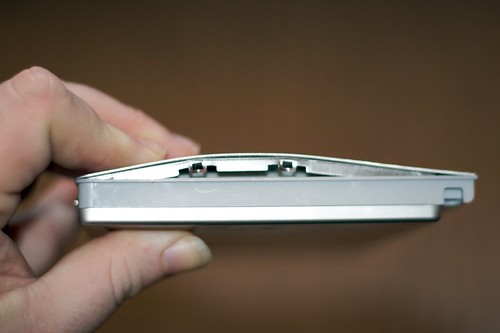
I physically looked at the profile of my machine to see my battery was SWOLLEN and it was pressing against the underside of my track pad. The two pegs on the battery really hold it tightly in place and the easiest way for the battery to expand is upwards. Only when there is no room left, it starts to drop below the bottom of the computer.
SO, long and short of it, take out your battery and keep your computer plugged in to see if this restores your clickers action and the sensitivity of you track pad. If it does, look up d
efective batteries or e
xploding batteries. There are a few batch numbers that are defective. They SHOULD replace it if yours is one of the offending batch numbers. If not, its only around $130 to fix the problem, IF in fact this is your issue.
Interested to see if taking out the battery fixes your problem.
Posted: Wed Jul 21, 2010 5:13 pm
by polar sky
Go to apple.com and make an appointment for them to look at it at your local mac store. They can sometimes fix small things with out charging you.
Posted: Wed Jul 21, 2010 6:04 pm
by zeitgeist
"i'm a PC"
and my mouse works


Posted: Wed Jul 21, 2010 8:05 pm
by polar sky
zeitgeist wrote:"i'm a PC"
and my mouse works
His mouse works too, it's his track pad that doesn't.
Posted: Wed Jul 21, 2010 8:13 pm
by polar sky
When they first came out with the Macbooks I went out and bought one and it had a few dead pixels, I took it back and got a new one and took it home to find out it had like 5 sticky keys. Took that back and got a third one and it would get sooo fucking hot it would completely shut off. So I took that one back and told them to keep their shit computer and they gave me my money back. I should have known NOT to run out and buy the first gen, do to the kinks that needed to be worked out. But I still have my desktop mac which is great.
Re: Macbook problems
Posted: Wed Jul 21, 2010 8:46 pm
by Shadowshocker
The Voice of Reason wrote:
I just had the same issue. Thought my track pad clicker was broken. It started to become EXTREMELY sensitive, to the point that just BARELY touching it would register a click.
I looked it up all over the net, NOTHING. No reports of that issue. For the hell of it , while searching for an answer, i read about about batteries getting too hot and bulging. Some almost blowing open from heat. My macbook pro was getting quite hot as well.
I physically looked at the profile of my machine to see my battery was SWOLLEN and it was pressing against the underside of my track pad. The two pegs on the battery really hold it tightly in place and the easiest way for the battery to expand is upwards. Only when there is no room left, it starts to drop below the bottom of the computer.
SO, long and short of it, take out your battery and keep your computer plugged in to see if this restores your clickers action and the sensitivity of you track pad. If it does, look up defective batteries or exploding batteries. There are a few batch numbers that are defective. They SHOULD replace it if yours is one of the offending batch numbers. If not, its only around $130 to fix the problem, IF in fact this is your issue.
Interested to see if taking out the battery fixes your problem.
thanks for the help, i'm going to try opening it up as soon as i get a chance.
i'll let you know how it goes
Posted: Fri Jul 23, 2010 3:17 pm
by markNine
Depending on how old your Macbook is, go ahead and take a can-o-air and spray out all of the dust that's accumulated. Especially in the fans.
Posted: Fri Jul 23, 2010 3:24 pm
by The Voice of Reason
Same thing that happened to my battery.
http://www.thoughtden.co.uk.php5-2.dfw1 ... ttery1.jpg
That caused my track pad and clicker to stop working properly.
Everything was fine once the battery was taken out, and when replaced.
Posted: Fri Jul 23, 2010 5:04 pm
by (parenthesis)
polar sky wrote:zeitgeist wrote:"i'm a PC"
and my mouse works
His mouse works too, it's his track pad that doesn't.
Posted: Sat Jul 24, 2010 1:09 am
by The Friendly Stranger
I had a similar problem but I lost both the trackpad and keyboard. After some research I found that under the battery there is a copper ribbon which is the connection for the keyboard and trackpad. Basically, I believe that the heat from the battery caused this ribbon to expand/distort and it was pulled loose from where it connected to the motherboard or something so it's basically a design fault. Luckily it was still under warranty so they changed the top case for me.
There was a quick fix I used to tide me over before I took it in. If you fold some paper or thin card up and place it on this ribbon and then replace the battery, it puts enough pressure on the ribbon to force the connection together and it works fine.
Hope this helps!
Posted: Wed Jul 28, 2010 1:18 pm
by hexagon son
polar sky wrote:When they first came out with the Macbooks I went out and bought one and it had a few dead pixels, I took it back and got a new one and took it home to find out it had like 5 sticky keys. Took that back and got a third one and it would get sooo fucking hot it would completely shut off. So I took that one back and told them to keep their shit computer and they gave me my money back. I should have known NOT to run out and buy the first gen, do to the kinks that needed to be worked out. But I still have my desktop mac which is great.
still running the 1st gen may 2006 macbook to this day. actually, today i just put 2 gigs of apple ram in, and the speed has picked up a lot. i too have the same problem with my trackpad click bar. i find it mildly annoying. apple should replace the battery for free if it is one of the faulty ones (i had, and they did), they even replaced my faulty magsafe power adaptor for free. these were both done through apple tokyo, even though i bought the computer in canada and had no applecare.
i think its just a wear and tear issue with the click bar.
Posted: Wed Jul 28, 2010 2:41 pm
by The Voice of Reason
hexagon son wrote:polar sky wrote:When they first came out with the Macbooks I went out and bought one and it had a few dead pixels, I took it back and got a new one and took it home to find out it had like 5 sticky keys. Took that back and got a third one and it would get sooo fucking hot it would completely shut off. So I took that one back and told them to keep their shit computer and they gave me my money back. I should have known NOT to run out and buy the first gen, do to the kinks that needed to be worked out. But I still have my desktop mac which is great.
still running the 1st gen may 2006 macbook to this day. actually, today i just put 2 gigs of apple ram in, and the speed has picked up a lot. i too have the same problem with my trackpad click bar. i find it mildly annoying. apple should replace the battery for free if it is one of the faulty ones (i had, and they did), they even replaced my faulty magsafe power adaptor for free. these were both done through apple tokyo, even though i bought the computer in canada and had no applecare.
i think its just a wear and tear issue with the click bar.
It actually isn't.
Swollen battery is the culprit.
http://www.appledefects.com/wiki/index. ... pad_button
images
http://farm3.static.flickr.com/2340/236 ... 3a506b.jpg
http://i.zdnet.com/blogs/mbp17-inch-battery.jpg
http://farm4.static.flickr.com/3619/334 ... 4be74d.jpg
There are three known batches of batteries that are prone to overheating that leads to swelling.
There is also the issue of the contacts being a little off that can be solved by placing a piece of paper between the contacts for the track pad and the battery. A weak solution yes, but a fix.