The other thread about TH's posters gave me some good ideas of making posters of each album cover and framing them. So I can use them to decorate my room. But I can't find good quality photo's from the other albums. I was wondering if any of you might have some of the album covers in poster format so I can use those.
The other thread had some good ones of TH with high quality and a good format. So if you guys have any other of:
Music has the Right to Children
Twoism
The Campfire Headphase
Geogaddi
It would be greatly appreciated!
Album Covers in Poster format.
Moderators: Aesthetics, Drones, Hexagon Sun
-
In_The_Annexe

- Eagle Minded
- Posts: 382
- Joined: Sun Apr 01, 2012 6:15 pm
- Location: Canada
my ladyfriend works at a photolab so I always custom print stuff, but you can also just go anywhere to print it off, most places have decent sizes. I printed the poster below from there and framed it.
If you want one album cover on a poster, just find yourself a high quality image on google.

If you want one album cover on a poster, just find yourself a high quality image on google.
you don't care to hear until you listen
In_The_Annexe wrote:my ladyfriend works at a photolab so I always custom print stuff, but you can also just go anywhere to print it off, most places have decent sizes. I printed the poster below from there and framed it.
If you want one album cover on a poster, just find yourself a high quality image on google.
Problem is, nearly every album cover I find doesn't fit the frame that I have (40x50). Anyway, I'll look around some more then. Thanks!


vitwelrel wrote:RVeldhuis wrote:purgruv wrote:Looks like a crop job or even try and extend the image to fit... That's sounds like something I'd enjoy.
Doesn't extending hurt the quality of the image?
Not if you trace it with vectors
You're gonna have to explain to me how you get a decent looking image out of vector tracing. I've used AI's vector tracing and that has effectively given me results that look nothing like the original image, unless I crank up the accuracy so high that it crashed my system. And then I still get garbage or try moving around and fine mismatched colors (or the good old "close enough!" Illustrator color conversion)
At this point "Trace Bitmap" in Illustrator is dead to me.
I could also be a bit cranky because I work in print, but for me it's high resolution or don't even bother printing it. I also don't trust web graphics because they're RGB, and the real world is CMYK. You'd be amazed as to how many people don't understand why that's important, and why neon green in RGB looks so dull in CMYK.
"Wait, Whaaaaaaaaaaaaaaaaaaaaaaaaaaaaaat????????"
---Roydon Ziegler III
---Roydon Ziegler III
-
thepastinsidepressant
- Sherbet Head
- Posts: 957
- Joined: Sun Jan 27, 2013 2:39 am
- Location: the past
ChipSuey wrote:I could also be a bit cranky because I work in print, but for me it's high resolution or don't even bother printing it. I also don't trust web graphics because they're RGB, and the real world is CMYK. You'd be amazed as to how many people don't understand why that's important, and why neon green in RGB looks so dull in CMYK.
yes i agree in what you're saying as in large runs on offest/litho, conversion to cmyk can give dull, though converting to Lab from Rgb first, then cmyk can sometimes save some of the vibrancy.
other than large runs, i use lambda printed in rgb for colour photography, looks amazing.
i reckon geogaddi would shine printed lambda
thepastinsidepressant wrote:ChipSuey wrote:I could also be a bit cranky because I work in print, but for me it's high resolution or don't even bother printing it. I also don't trust web graphics because they're RGB, and the real world is CMYK. You'd be amazed as to how many people don't understand why that's important, and why neon green in RGB looks so dull in CMYK.
yes i agree in what you're saying as in large runs on offest/litho, conversion to cmyk can give dull, though converting to Lab from Rgb first, then cmyk can sometimes save some of the vibrancy.
other than large runs, i use lambda printed in rgb for colour photography, looks amazing.
i reckon geogaddi would shine printed lambda
That RGB>LAB>CMYK conversion has helped me out so many times.
Vector tracing will completely change the image outright, and blowing it up from there will only make it worse. Your image is only as good as its original size, in the same way you can't make an audio file better quality by upscaling its bit rate.
With that said, the best bet for making any poster is to scan an album cover at a resolution which will equal 300 dpi at its full size when printed. So if the art is 12x12 (record sleeve) and you want to print at 24x24, scan it at 600 dpi. Another option would be to take a photo with a good quality camera, but depending on the lighting, you may have to do quite a bit of work in Photoshop to get it looking correct colorwise.
With that said, the best bet for making any poster is to scan an album cover at a resolution which will equal 300 dpi at its full size when printed. So if the art is 12x12 (record sleeve) and you want to print at 24x24, scan it at 600 dpi. Another option would be to take a photo with a good quality camera, but depending on the lighting, you may have to do quite a bit of work in Photoshop to get it looking correct colorwise.
ChipSuey wrote:You're gonna have to explain to me how you get a decent looking image out of vector tracing. I've used AI's vector tracing and that has effectively given me results that look nothing like the original image, unless I crank up the accuracy so high that it crashed my system. And then I still get garbage or try moving around and fine mismatched colors (or the good old "close enough!" Illustrator color conversion)
At this point "Trace Bitmap" in Illustrator is dead to me.
I meant as in actually tracing it by using the pen tool and/or shapes. Yes, it would be tedious work, but if done well, the end result will look decently enough.
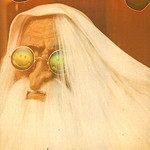
I put this together if anyone wants it, looks great printed out, don't let the hi res shock you:
unofficial "in a beautiful place out in the country poster" @ 18x24 300dpi:
https://dl.dropboxusercontent.com/u/104 ... 018x24.jpg
Did a shitty crop job real quick, but you get the idea:

This geogaddi promo poster too @ 18x24:
https://dl.dropboxusercontent.com/u/104 ... 018x24.jpg
unofficial "in a beautiful place out in the country poster" @ 18x24 300dpi:
https://dl.dropboxusercontent.com/u/104 ... 018x24.jpg
Did a shitty crop job real quick, but you get the idea:
This geogaddi promo poster too @ 18x24:
https://dl.dropboxusercontent.com/u/104 ... 018x24.jpg